Chandra PSMC model tools
This suite of tools provides the tools to use and maintain the Chandra ACIS PSMC model. The key elements are:
- psmc_check.py: Thermal check of command loads and validate PSMC model against recent telemetry
- psmc_calibrate.py: Calibrate PSMC model coefficients
- twodof.py: Actual PSMC model code
- characteristics.py: Characteristics used in model evaluation
The PSMC tools depend on Sybase tables and in particular the commanded states database which is accessed primarily via the Chandra.cmd_states module.
psmc_check
Overview
This code generates backstop load review outputs for checking the ACIS PSMC temperatures 1PIN1AT and 1PDEAAT. It also generates PSMC model validation plots comparing predicted values to telemetry for the previous three weeks.
Command line options
| Option | Description | Default |
|---|---|---|
| -h, –help | show this help message and exit | |
| –outdir=OUTDIR | Output directory | out |
| –oflsdir=OFLSDIR | Load products OFLS directory | None |
| –power=POWER | Starting PSMC power (watts) | From telemetry |
| –simpos=SIMPOS | Starting SIM-Z position (steps) | From telemetry |
| –pitch=PITCH | Starting pitch (deg) | From telemetry |
| –T_dea=T_DEA | Starting 1pdeaat temperature (degC) | From telemetry |
| –T_pin=T_PIN | Starting 1pin1at temperature (degC) | From telemetry |
| –dt=DT | Time step for model evaluation (sec) | 32.8 |
| –days=DAYS | Days of validation data (days) | 21 |
| –traceback=TRACEBACK | Enable tracebacks | True |
| –verbose=VERBOSE | Verbosity (0=quiet, 1=normal, 2=debug) | 1 (normal) |
The model starting parameters (temperature and spacecraft state) can be specified in one of two ways:
- Provide all of the power, simpos, pitch, T_dea, and T_pin command line options corresponding to the expected state at the load start time. This may be necessary in the event of complex replan situations where the second option fails to capture the correct starting state. In this case the cmd_states table is not used.
- Provide none of the above command line options. In this case the tool will propagate forward from a 5-minute average of the last available telemetry using the cmd_states table. This table contains expected commanding from the approved command loads in the operations database. This is the default usage.
Usage
The typical way to use the load review tool =psmc_check.py= is via the script launcher =/proj/sot/ska/bin/psmc_check=. This script sets up the Ska runtime environment to ensure access to the correct python libraries. This must be run on a 64-bit linux machine. Presently the OS should be Fedora Core 8; other configurations may fail.
/proj/sot/ska/bin/psmc_check --outdir=out --oflsdir=/data/mpcrit1/mplogs/2009/MAY1809/oflsb
/proj/sot/ska/bin/psmc_check --simpos -99616 --ra 30 --dec 40 --roll 50 --T_dea 40 --T_pin 30 --power 80
psmc_calibrate.py
Calibrate PSMC model coefficients using telemetry from specified time range.
Usage: psmc_calibrate.py [options]

Options:
  -h, --help            show this help message and exit
  --datestop=DATESTOP   Stop date for calibration dataset
  --ndays-acis=NDAYS_ACIS
                        Number of days for ACIS
  --ndays-hrc=NDAYS_HRC
                        Number of days for HRC
  --figroot=FIGROOT     Figure root name
  --fit                 Do fitting
  --no-fit              Do not do fitting
Current calibration plots
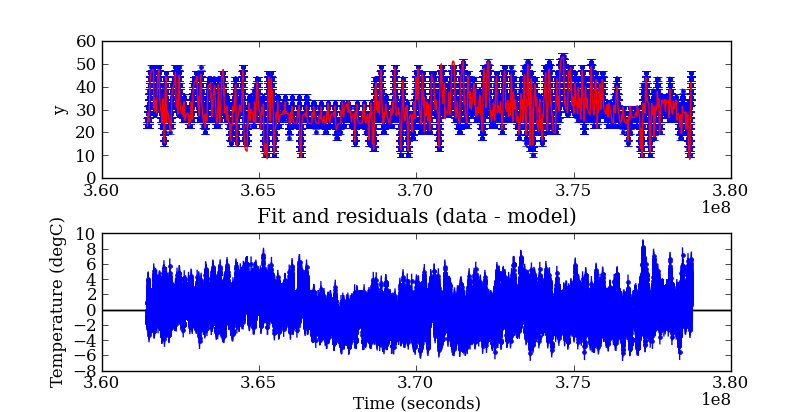
Fit and residuals (data-model)
Note: the drop around T=3.67e8 is believed to be due to turning off the FA6 heater near 2009:227.
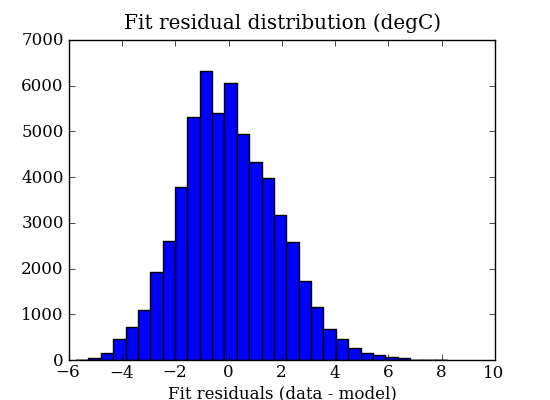
Fit residual histogram
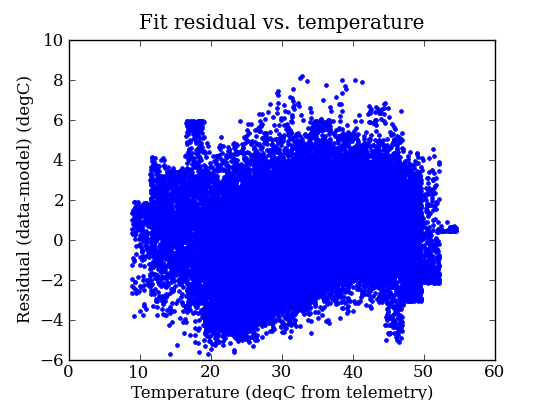
Residuals (data-model) vs. temperature (telemetry)
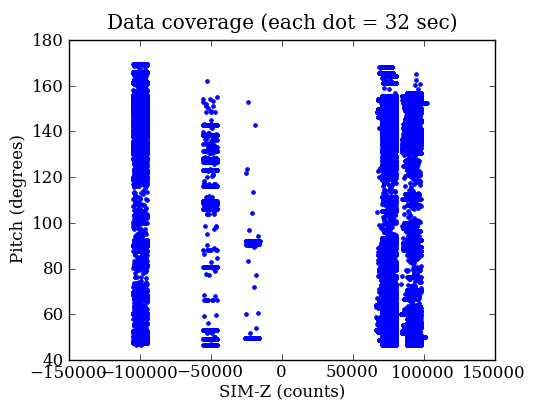
Pitch vs. SIM-Z coverage
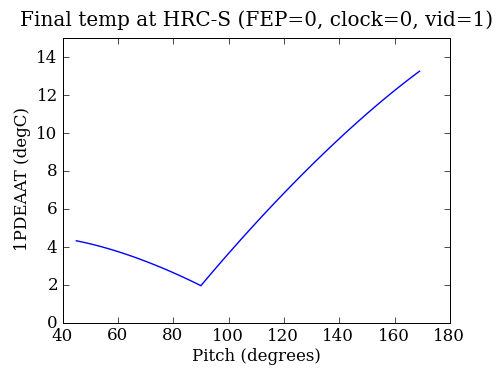
SCS 107 settling temperatures
Update procedure
Start a PSMC model or code update as follows:
cd <scratch_dir>
hg clone /proj/sot/ska/hg/psmc
cd psmc
To update the calibration do:
python psmc_calibrate.py |& tee psmc_calibrate.log
Compare parameters to existing values. Watch for outliers and examine fit_pitch_simpos.png for coverage. Note that this plot shows coverage for the ACIS time interval (typically 180 days) instead of the HRC interval (typically 360 days).
Update the model_par definition from screen output or psmc_calibrate.log and update the calibration VERSION in characteristics.py.
Test the new code or characteristics file by running the following with <DATE> set to a date a day or two before the schedule start:
/proj/sot/ska/bin/psmc_check --oflsdir <latest_ofls_dir> --outdir out_release --run_start_time <DATE>
python psmc_check.py --oflsdir <latest_ofls_dir> --outdir out_pre --run_start_time <DATE>
./scs107_settling.py
Ensure that results are sensible and that the VERSION matches expectation.
Quantify improvement in predictions, where <DATE> is a date a few days ago:
/proj/sot/ska/bin/psmc_check --run_start_time <DATE> --outdir val_release --days 180
python psmc_check.py --run_start_time <DATE> --outdir val_pre --days 180
Compare the quantiles and possibly overplot the histograms.
Update VERSION in characteristics.py and psmc_check.py as needed. Update VER_MINOR in Makefile for changes not affecting controlled products (e.g. doc updates etc). Then create the new VERSION file.
make version
Update RELEASE notes in TWiki format. Copy to PSMC release notes.
Examine diffs then commit the changes:
hg status
hg extdiff -p tkdiff psmc_check.py   # etc
hg commit -m "Update model calibration with data through <stopdate>: version <VERSION>"
Obtain review approval at the load review, install new files, and test:
make version
make docs
make dist
make install
/proj/sot/ska/bin/psmc_check --oflsdir <latest_ofls_dir> --outdir out_post
Make sure that out_post and out_pre results are identical.
Push back to main repository:
hg outgoing /proj/sot/ska/hg/psmc
hg push /proj/sot/ska/hg/psmc
cd /proj/sot/ska/hg/psmc
hg update